
Home / BERTBrain Software / BAS Integration
BAS & BACnet Integration
BERT and Your Building Automation System
Your BAS runs HVAC, central plant, and selected lighting. BERT manages the printers, displays, charging carts, PTACs, and other plug and process loads it usually doesn't reach. BERT runs standalone by default, and connects to your BAS through BERT Connect when your project calls for it.
A Complement to Your BAS, Not a Replacement
Building automation systems focus on large central systems. Many plug-connected and smaller hardwired loads stay energized through nights and weekends, even when idle. That gap is where BERT works.
| Typical BAS | BERT | |
|---|---|---|
| Primary loads | HVAC, central plant, selected lighting | Plug-connected and approved hardwired process loads |
| Control point | Equipment and zone controllers | The individual device, receptacle, or circuit |
| Measurement | System and zone level | Device level, ±3% |
| Who manages it | BAS technicians and controls contractors | Authorized facility, energy, IT, and partner staff in BERTBrain |
Standalone by Default
BERT systems normally operate independently of the BAS. That keeps projects simple: no changes to BAS programming, no BAS licenses, and facility and energy staff can manage plug loads in BERTBrain without BAS programming privileges.
- No BAS replacement or customer-provided server
- Schedules stored at each controller
- Loss of BAS, internet, or Wi-Fi communication does not by itself erase local schedules
When Integration Makes Sense
Choose integration when your operators want plug load status and commands on the BAS front end, or plug load data in existing alarms, trends and workflows. BERT and your team decide this during design, before controllers and the network are finalized.
B.A.X Building Automation Expanded™ works on its own through BERTBrain. BERT Connect is how it joins your existing building automation system, exchanging approved BERT device information and commands over BACnet/IP when your project includes it.
How a BERT System Fits Together
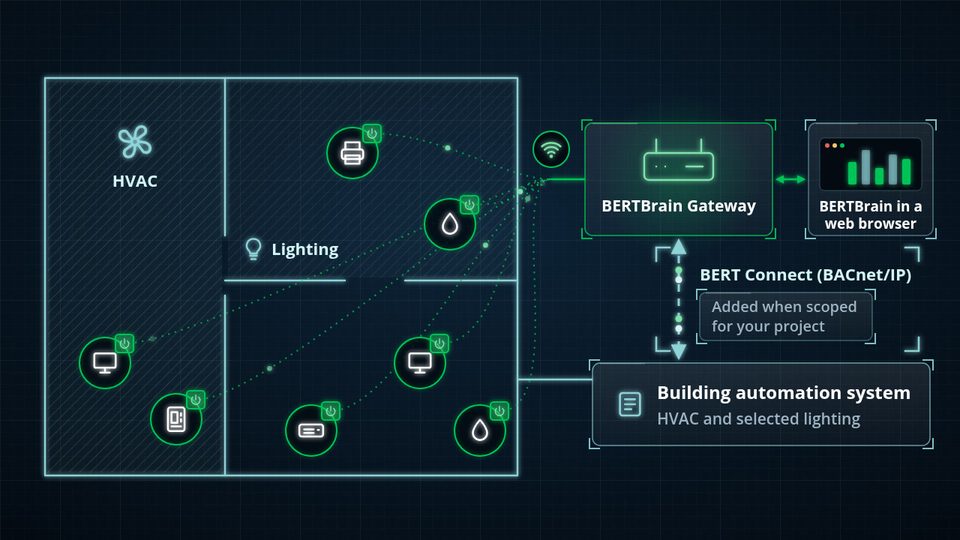 Watch: BERT + Your BAS (0:25)
- Your BAS runs HVAC and selected lighting.
- BERT reaches the plug and process loads it doesn’t.
- Runs on its own; no BAS required.
- Optional: BERT Connect exchanges approved device data and commands with your BAS over BACnet/IP.
- If the BAS link, Wi-Fi or the internet drops, each controller keeps running its stored schedule.
Integration Options
BERT Connect: BACnet/IP
BERT Connect is BERT's optional BACnet/IP integration. It exchanges approved BERT device information and commands with your building automation system. Selected data and commands are exposed as BACnet/IP objects and points for individual-device monitoring or control.
REST API Integration
For third-party platforms and custom workflows, BERT offers optional RESTful-service integration. Like BACnet/IP, it is separately specified, licensed, secured, and commissioned.
Integration is not included in a standard BERT system or gateway. It is added when your project documents and agreement identify it.
How an Integration Is Scoped
Clear scoping keeps BAS integrations predictable. For projects that include BERT Connect, the integration submittal defines:
Points
BACnet/IP topology, object types, point count, naming convention, and which points are read-only or writable.
Commands
Command priorities, the BAS's role alongside BERT schedules, and the response when communication is lost.
Responsibilities
Licensing, security, and who does what. The BAS contractor typically handles routing, discovery, point mapping, graphics, programming, alarms, and trends.
Commissioning then verifies the approved objects, points, commands, status values, priorities, and loss-of-communication response—and only those.
For Engineers and Controls Contractors
BERT's Core Guide Specification (Section 26 09 80) covers standalone operation and optional integration, with coordination to Division 25 when building automation integration is required. Holding a coordination meeting with the owner, BERT, the electrical contractor, owner IT, and the BAS contractor early keeps the integration on schedule.
Questions to Settle in Design
- Standalone or integrated?
- BACnet/IP or REST?
- Which points, and which are writable?
- Who owns BAS-side programming and graphics?
- What happens when communication is lost?
Questions About BAS Integration
Does BERT replace a building automation system?
No. A BAS manages HVAC, central plant, and selected lighting. BERT manages the plug and process loads a BAS usually does not reach: printers, displays, charging carts, window AC, PTACs, and similar equipment. The two work side by side.
Do we need BAS integration to use BERT?
No. The standard BERT deployment runs standalone, and authorized users manage it directly in BERTBrain. Integration is optional and is scoped only when it improves the project.
Does every BERT controller appear as a native BACnet device?
Not necessarily. BERT controllers communicate with the BERTBrain Gateway. When BACnet/IP integration is included, selected device data and commands are exposed as BACnet/IP objects and points defined in the project's integration documents.
What happens if the BAS connection is lost?
Loss of BAS communication does not stop BERT controllers from running their approved, locally stored schedules.
Who does the BAS-side work?
Unless BERT's written scope says otherwise, the owner's BAS contractor handles BAS network routing, discovery, point mapping, graphics, programming, alarms, trends, and final integration. BERT provides the approved integration scope and point list.
Let’s See What Your Buildings Could Save
Tell us about your facilities and we will size the opportunity: device counts, control hours and a savings range you can take to your team.